Ordering Textbooks with the NKU Bookstore
With step-by-step instructions and screenshots, this is your complete guide to ordering textbooks from the NKU Bookstore! Click below to begin!
Part One: Creating Your Order
To start your textbook journey, you'll need to go online to shopnku.com
While on shopnku.com, you'll want to go to the drop-down menu that says "COURSE MATERIALS & TEXTBOOKS"
In the drop-down menu, select "FIND COURSE MATERIALS"
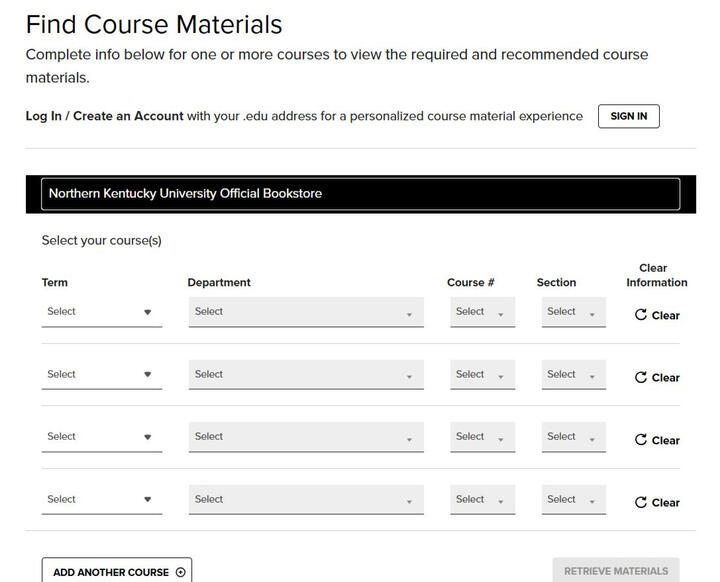
Next you'll need your NKU class schedule! Insert the term, department, course number, and section number for each class
After inputting all the information for each one of your classes, hit the "RETRIEVE MATERIALS" button at the bottom right
Part Two: Selecting Your Course Materials (Meanings Explained)
After following the steps from part one, you'll see that all your classes have been pulled up and have various options to choose from. This section explains all the different options and what different things mean!
LABELS
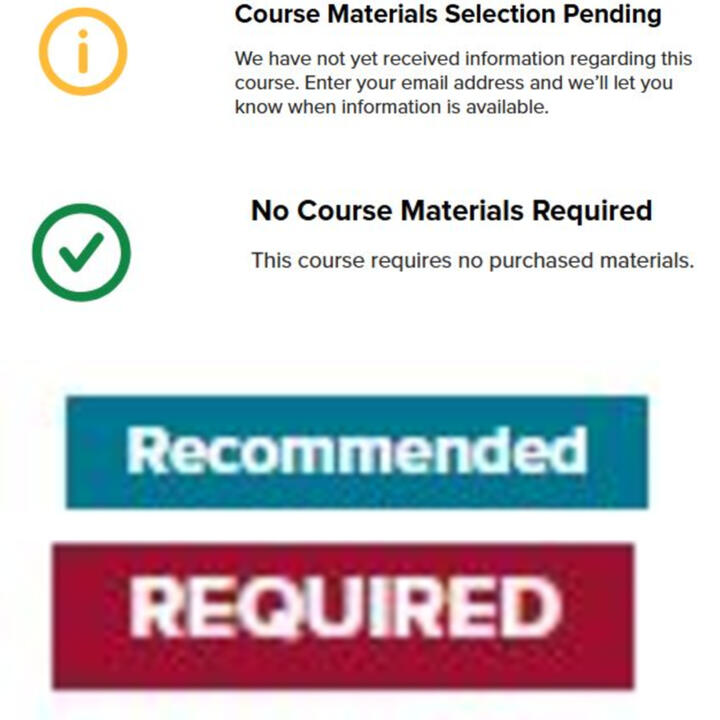
"COURSE MATERIALS PENDING" - the bookstore does not have any materials available. Please consult your professor.
"NO MATERIALS REQUIRED" - no materials are required for the course.
The blue "RECOMMENDED" label means that a textbook would be highly beneficial to your learning but is NOT required.
The red "REQUIRED" label means that a book is absolutely necessary for a class and you need to get it.
PURCHASE OPTIONS
NEW VERSUS USED: Used books will be the cheaper option. They have been used by previous students and, while not in absolute pristine condition, are just like something you'd get from a library! Used books have LIMITED AVAILABILITY and so you may still wind up with a new book even though you selected used and vice versa (more on that later).
RENTING VERSUS PURCHASING: Renting a book means that you borrow it for the semester at a reduced price than purchasing and must return it on the last day of finals week. Purchasing the book means that you will own it, but you pay full price.
NOTE: if you do not return the rental book by the due date, you will be charged for the book + a late fee.
PRINT VERSUS DIGITAL: Print option means that it is a physical item. Usually this means it is a physical book, but can also mean it is a digital access code that is printed and must be scratched off to be redeemed. Digital means that this content is accessible through a digital library and you will not receive any physical media. Most of our digital content is accessed through our e-platform, Yuzu. When purchasing a digital option, you should get instructions sent to your email on how to access that content within 24 hours of your purchase.
Part Two: Selecting Your Course Materials (Picking the Right Option for You)
When deciding between NEW and USED copies, it is important to determine what you need out of the book. If you're okay with a not fresh-off-the-print book and potentially some highlights and notes, we recommend used books. As mentioned earlier, books have limited availability and you may not get which option you choose. This will be further discussed in Part Three: Checking Out.
When deciding between PURCHASING and RENTING we recommend taking these things into account: Is this book for a class in my major? Will this book be useful in future courses? How much content do I think I can get out of this book? Most of the time, we HIGHLY recommend renting, as it's cheaper and keeps you from collecting a large stack of books you may not need! (Plus, you're completely welcome to write and highlight in your rentals!)
When deciding between PHYSICAL and DIGITAL, this mostly comes to personal preference and whether you prefer a physical book or reading on a device. Sometimes, you won't be given a choice and must choose one or the other. This is because a book/content isn't available in both formats.
After deciding which options you want to choose, make the selection and don't forget to hit the "ADD TO CART" button! Once you have done that for all your books, scroll down to the bottom where it says "PROCEED TO CART" and click that!
Part Three: Correctly Checking Out
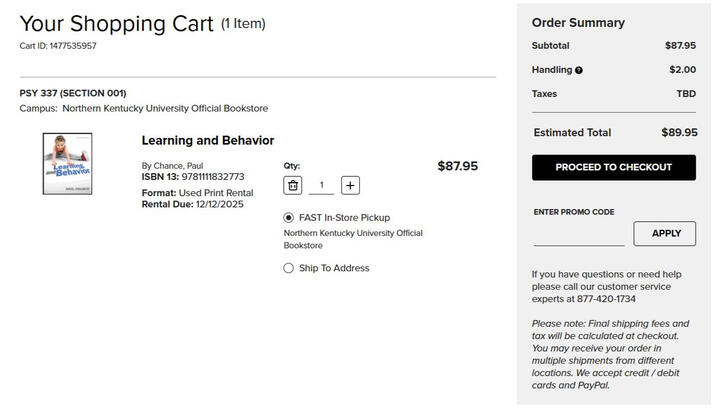
Once hitting "PROCEED TO CART" you will be brought to the following screen. It is on this screen where you can select between In-Store Pickup and Shipping for your delivery method. In this example image we only have one textbook, but keep in mind that this option will be listed with EVERY book!
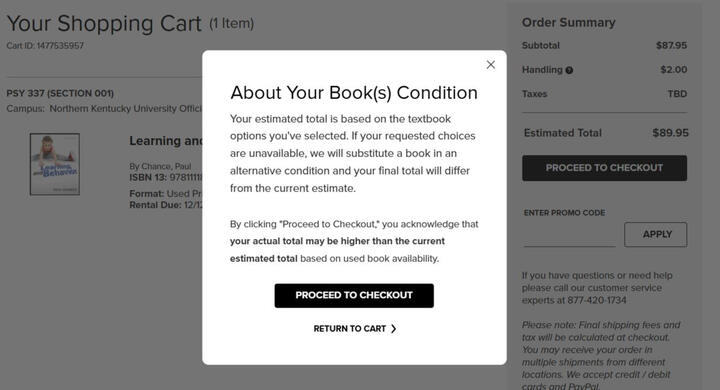
Once you have made your delivery selections and select "PROCEED TO CHECKOUT" you will receive this pop up. This explains that you may not get your desired book condition and that your final total will reflect the price of what book condition we were able to fill for you. (Essentially, if we do not have a used book, we will fufill your order with a new book instead.)
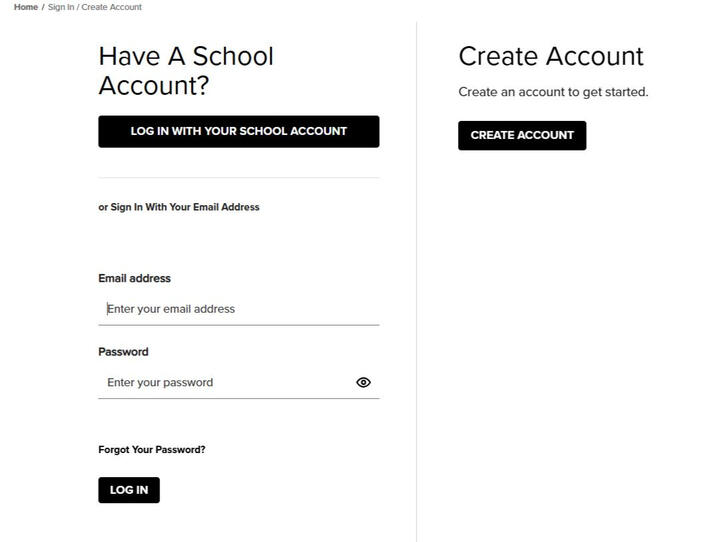
From there you'll be brought to a login screen and we HIGHLY reccomend logging in with your school account! Not only is it easy but then all your emails regarding books and any digital content will be tied to your school email.After signing in, you will first provide either shipping address information or information about who will be picking up your books.
Next is payment information. If you are getting rental books, you MUST secure your rental with a card even if you are using financial aid: if the books are not returned by the final date, this is the card that will be charged. For the next section, please select which type of payment you plan on using.
Part Three: Correctly Checking Out (Credit/Debit)
This option will have you provide your card information and billing address, just like checking out on any other website. Easy and simple!Click here to continue!
Click here to select instructions for a different form of payment!
Part Three: Correctly Checking Out (Student Loans/Remaining Financial Aid)
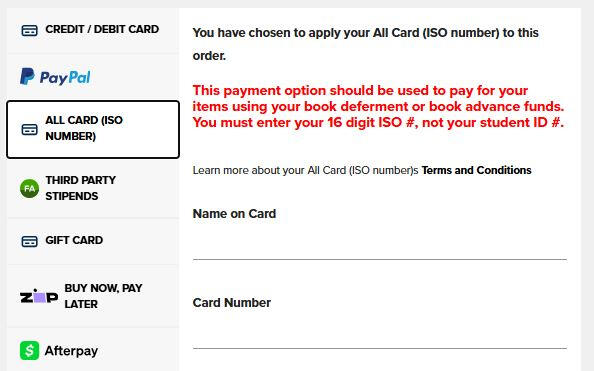
This option is for using remaining student loan money and scholarship/government financial aid. For this option, you must first SPEAK TO THE FINANCIAL AID OFFICE about having these funds allocated to your All Card to get books at the bookstore. 24 hours after doing so, you can check out using the "ALL CARD (ISO)" option. For this option, you will be using the ISO number on your All Card that you should have received at orientation to check out. Don't have an All Card? Contact the All Card Office to get an ISO.Click here to continue!
Click here to select instructions for a different form of payment!
Part Three: Correctly Checking Out (Third Party Stipend)
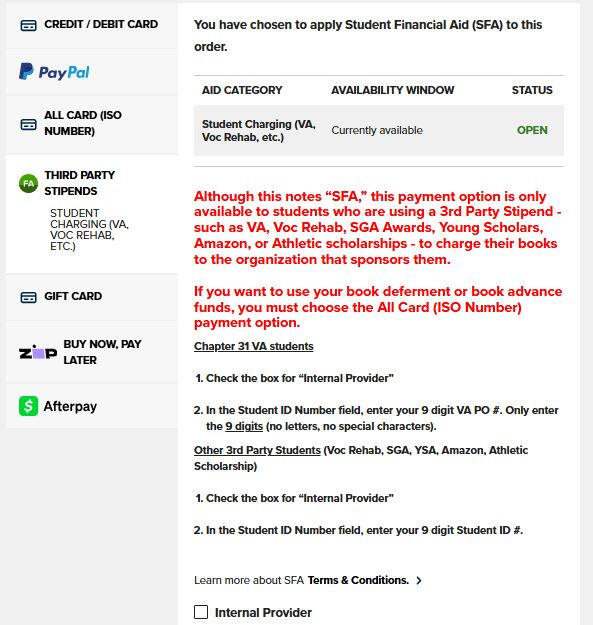
For third party stipends, you'll want to use the third party stipends tab. First, you'll check the box that says "Internal Provider" which will bring up a place for you to insert your student ID number.For VA students, you'll want to use your nine digit PO that always starts with a 3 (the number you get from your counselor)! Please ensure to do this, otherwise your order will fail. If you have any issues with your VA PO number, please contact the bookstore at 859-572-5142 during our business hours.Click here to continue!
Click here to select instructions for a different form of payment!
Important Notes and Information
After completeing the last self-explanatory steps (terms and conditions if you have rentals, and reviewing your order) you have successfully placed an order! Keep an eye on your email as you'll get a confirmation for your order as well as get notifications about when your order has either been shipped or is ready for pick up. You will also get a notification if any payments have failed with a link to correct/change payment.You may also be notified that your order has been backordered. This means that we do not have any physically in stock and are waiting on more to be sent to us. Your backorder guarantees you one of the incoming copies, so we highly recommend keeping your order instead of cancelling it! You won't be charged until we have the book ready for pickup/shipping as well, so you don't need to worry about getting charged for a book you don't have.Lastly, if you chose to pick up your book in store, you have 30 days from the time it is ready for pick up to come and get it. If your order has been ready for 30 days and it is not picked up, we will mark it as "abandoned" which means that we will be returning it to our stock and it will no longer be reserved for you. Please note that this DOES NOT MEAN YOU GET A REFUND. You will still be charged in full for the book as it had been held for 30 days.To get a refund, the following criteria must be met:
-Books must be in their original condition
-Access codes have not been scratched off
-Shrink wrapped books were not opened
-Digital content has not been accessed
-Scrubs were not worn in a hospital setting
-The original receipt is providedRefunds on course materials are only available during the first week of classes; after this, all sales are FINAL*
*Refunds for dropped courses will be provided with proof of schedule change within 30 days of classes startingCONGRATULATIONS! YOU CAN NOW SUCCESSFULLY PLACE TEXTBOOK ORDERS ONLINE WITH THE NKU BOOKSTORE!Click here to return to the beginning of this website